Building Thread Call: What I Learned About WebRTC, Whisper and AI Summaries
I wanted to learn WebRTC, so I built a Slack-like app with huddles that records, transcribes and summarizes calls. Here's the whole story, from theory to architecture.
I'd never touched WebRTC before this project. I could have read the spec or followed a course, but that's not how I learn best. I learn by building something I actually want to exist.
I'd always liked the idea of a Slack clone, so that became the vehicle. But a plain clone wouldn't have taught me much I hadn't seen before, so I asked myself what would make it more fun. The answer: when a huddle ends, the app should give you a summary of what was said. That's how Thread Call started.
This post covers all of it: the WebRTC basics I had to learn first, the decisions I made along the way (and why), and how the whole thing fits together.
So what is Thread Call?
It's the same idea as my Slack clone, with channels, real-time messaging and huddles. The difference is what happens after a call. Background workers transcribe the recording, and an LLM turns the transcript into a summary.
- An HTTP API for auth, workspaces, channels and other CRUD
- WebSockets for real-time events and WebRTC signaling
- Browser-native peer-to-peer WebRTC for audio and video
- Recording in the browser, with files stored in object storage
- Background workers for transcription and summaries
What I needed to understand first
I assumed WebRTC would just connect two browsers and start sending audio. It's not that simple. A lot has to happen before the first packet of media moves.
What WebRTC does (and doesn't do)
WebRTC takes care of the real-time media part: capturing audio and video, finding a network path, encrypting everything, and sending it. What it doesn't do is help two peers find each other in the first place. That's your job, and it's called signaling.
SDP
SDP (Session Description Protocol) is just a block of text that describes a media session: what kinds of media, which codecs, and the settings needed to get going. The caller creates an offer, the other side replies with an answer, and now both know what the other can handle.
Signaling
Signaling is whatever channel you use to carry offers, answers and ICE candidates between peers. WebRTC doesn't care what it is. I used a Go WebSocket server.
Peer A
   |
   | rtc.offer / rtc.ice
   v
Go WebSocket server
   |
   | rtc.offer / rtc.ice
   v
Peer B
One thing that's easy to miss: in the normal case, my server never touches the audio or video. It only helps the browsers introduce themselves.
ICE, STUN and TURN
Most devices sit behind a NAT or firewall, so two browsers can't just call each other directly. ICE (Interactive Connectivity Establishment) is how WebRTC works around that. It collects possible network paths, called candidates, and tests them. There are three kinds:
- Host: addresses on your local network
- Server-reflexive: your public address, found with the help of a STUN server
- Relay: an address on a TURN server that passes media along for you
STUN: "what do I look like from the public internet?"

Alice Browser ── STUN request ──► STUN server
Alice Browser ◄── "203.0.113.10:52143" ── STUN server
STUN never carries your media. It just tells you your public address so a direct connection has a chance. When a direct path really isn't possible, say because of a symmetric NAT, TURN steps in and relays the media:
Peer A ───────► TURN server ───────► Peer B
          media is relayed
TURN is the fallback, not the first choice. Relaying all that traffic costs bandwidth, so you only want it when nothing else works.
The WebRTC lifecycle, step by step
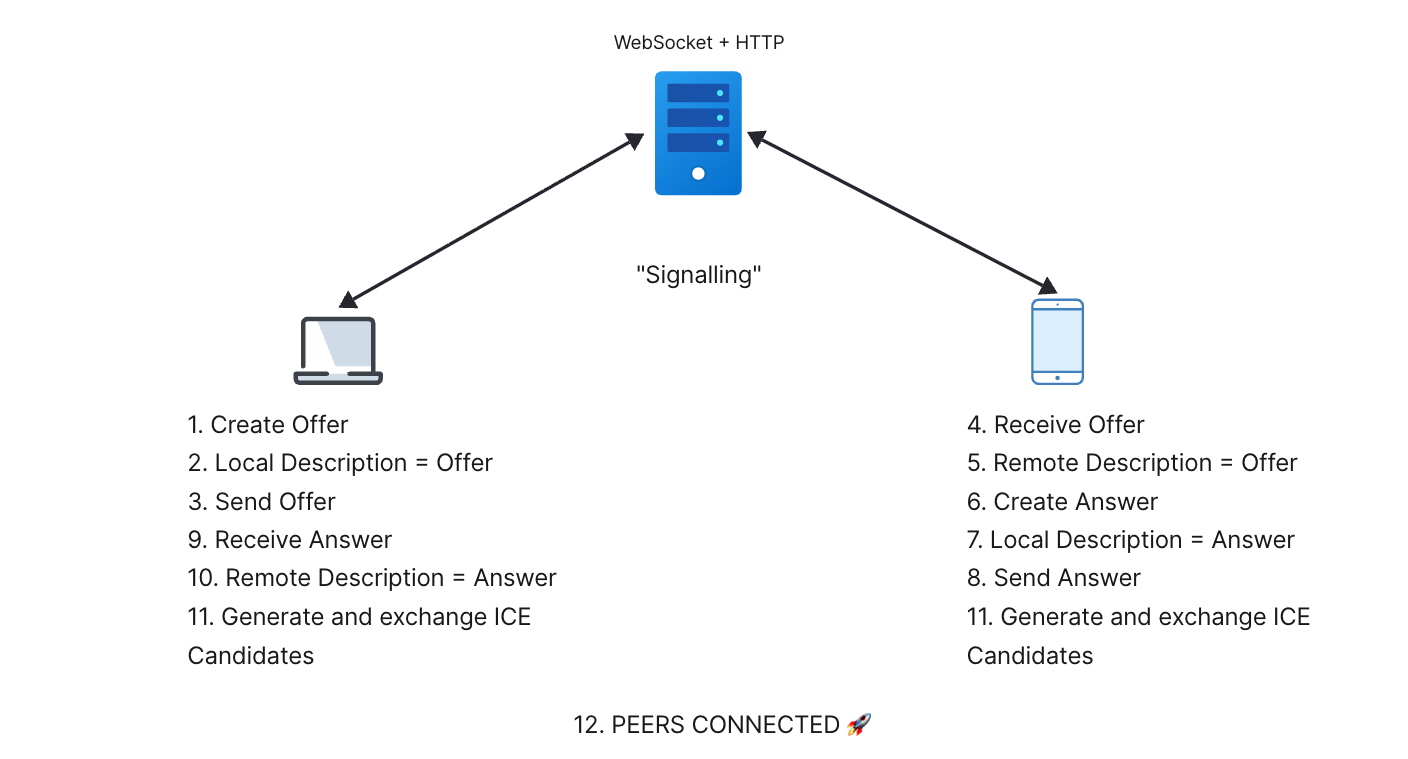
This is the diagram I drew while figuring it out. Read it as two peers, with the signaling server sitting between them.
1. Grab the user's media
const stream = await navigator.mediaDevices.getUserMedia({
  audio: true,
  video: true,
})
2. Create the peer connection
const peerConnection = new RTCPeerConnection({
  iceServers: [
    { urls: "stun:stun.l.google.com:19302" },
    {
      urls: [
        "turn:free.expressturn.com:3478?transport=udp",
        "turn:free.expressturn.com:3478?transport=tcp",
      ],
      username: import.meta.env.VITE_TURN_SERVER_USERNAME,
      credential: import.meta.env.VITE_TURN_SERVER_CREDENTIAL,
    },
  ],
})
3. Add your tracks
for (const track of stream.getTracks()) {
  peerConnection.addTrack(track, stream)
}
4. Create the offer and set it locally
const offer = await peerConnection.createOffer()
await peerConnection.setLocalDescription(offer)
This is the step that tripped me up the most. setLocalDescription() does not send the offer to anyone. It just tells your own browser, "this is my session description." As a side effect, it also starts ICE gathering.
5. ICE gathering starts
The moment the local description is set, the browser starts hunting for candidates. It doesn't wait for the answer. Each one gets sent through signaling as soon as it's found:
peerConnection.onicecandidate = (event) => {
  if (!event.candidate) return

  socket.send(
    JSON.stringify({
      msg_type: "rtc.ice",
      call_id: callId,
      candidate: event.candidate,
    }),
  )
}
6. Send the offer
socket.send(
  JSON.stringify({
    msg_type: "rtc.offer",
    call_id: callId,
    sdp: peerConnection.localDescription,
  }),
)
7. Peer B receives it and sets the remote description
await peerConnection.setRemoteDescription(
  new RTCSessionDescription(message.sdp),
)
This is how I finally remembered which is which:
setLocalDescription()is my descriptionsetRemoteDescription()is their description
8. Peer B creates an answer and sends it back
const answer = await peerConnection.createAnswer()
await peerConnection.setLocalDescription(answer)

socket.send(
  JSON.stringify({
    msg_type: "rtc.answer",
    call_id: callId,
    sdp: peerConnection.localDescription,
  }),
)
9. Peer A applies the answer
await peerConnection.setRemoteDescription(
  new RTCSessionDescription(message.sdp),
)
10. Both sides keep trading ICE candidates
await peerConnection.addIceCandidate(
  new RTCIceCandidate(message.candidate),
)
A gotcha worth knowing: a candidate can show up before the remote description has been set, and adding it too early throws an error. Queuing candidates until the remote description is in place saves you from some annoying, intermittent bugs.
11. Connectivity checks, then media
Now WebRTC tests pairs of candidates from both sides until one works. Once it has a winner, it sets up encryption with DTLS and starts sending media over SRTP.
Candidate pair selected
        ↓
      DTLS   (key exchange)
        ↓
      SRTP   (encrypted media)
        ↓
  Audio / Video flowing
The same thing, with STUN and TURN added
This second diagram shows the full exchange. Peer A asks STUN who it is, finds out it's behind a symmetric NAT, and asks TURN for a relay. The offer, answer and ICE candidates then go through the signaling channel, while Peer B does its own STUN lookup.
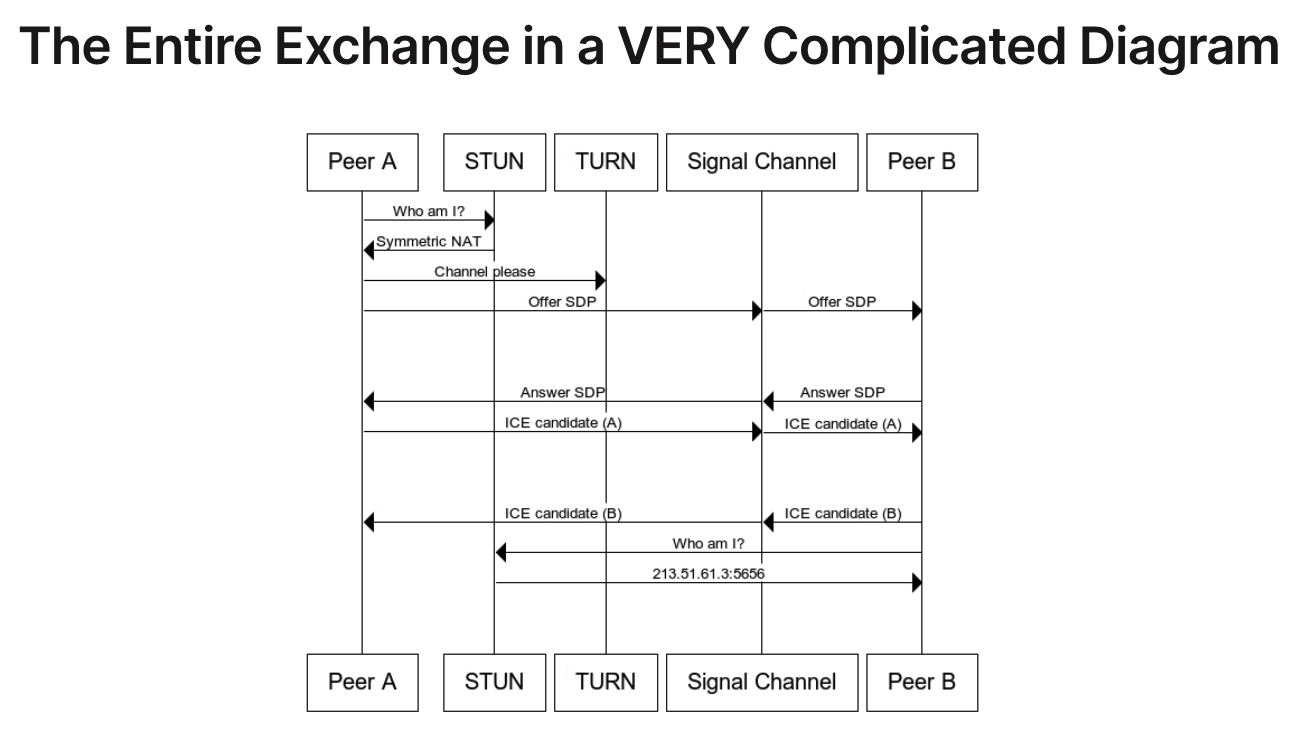
One honest caveat: my numbered diagram puts ICE exchange near the end to keep it readable. In reality it overlaps with the offer and answer, because gathering starts right after the local description is set.
The error that made it click
Failed to set remote answer SDP:
Called in wrong state: stable
I hit this one a lot. It means the connection isn't in the signaling state your code expects. Maybe an answer was applied twice, maybe messages arrived out of order, maybe two negotiations ran at once. Fixing it made me stop thinking of WebRTC as a single connect() call and start seeing it for what it is: a state machine that spans signaling, ICE and media transport.
Why I went peer-to-peer instead of using Pion
The obvious alternative was server-side WebRTC: run an SFU in Go with Pion, have everyone send media to my server, and let it forward the streams. I chose not to start there, for three reasons.
I wanted to learn it from 0 to 100
If I'd jumped straight to Pion, I'd have been running a media stack before understanding the basics. Starting with browser-native P2P forced me to learn SDP, signaling, ICE, STUN, TURN, DTLS and SRTP properly. Once that foundation feels solid, moving toward Pion is the plan.
My server capacity is small
With P2P, the browsers send media straight to each other, so that load lands on the clients instead of my server. My Go backend never has to receive and forward every audio and video packet.
P2P                                SFU

Peer A ◄───────► Peer B            Peer A ───►
     direct media                              │
                                   Peer B ───► SFU ───► other peers
                                               │
                                   Peer C ───►
That doesn't make the server free, though. Signaling, auth, call state, uploads, background jobs and any TURN relay traffic all still cost something.
It's a smaller system to start with
For a two-person call, P2P is the simplest thing that works. There's no media server to deploy or babysit.
Where P2P falls apart
In a mesh, every participant uploads a separate copy of their media to everyone else, so the cost grows fast as the call gets bigger. For larger group calls, an SFU like Pion, LiveKit or mediasoup is the right answer. So this isn't me claiming P2P is better. It's the right call for the scope I have today.
Recording and the background pipeline
Recording happens in the browser using the MediaRecorder API:
const recorder = new MediaRecorder(stream)

recorder.ondataavailable = (event) => {
  if (event.data.size > 0) {
    chunks.push(event.data)
  }
}

recorder.start()
When the huddle ends, those chunks become an audio file that gets uploaded to MinIO. I didn't want big audio files sitting in PostgreSQL, so the database only stores metadata and a reference, while MinIO holds the actual recording.
Transcribing and summarizing both take a while, and I didn't want the request that ends a huddle to hang around waiting for them. So ending a call just finalizes the recording, uploads it, queues a background job and returns right away. A worker picks it up from there.
User ends huddle
       ↓
Recording finalized
       ↓
Upload audio to MinIO
       ↓
Create background job
       ↓
Return control to user

Background worker
       ↓
Fetch audio from MinIO
       ↓
Speech-to-text
       ↓
Store transcript
       ↓
Summarize (when worthwhile)
       ↓
Store summary
Transcription: OpenRouter first, then whisper.cpp
My first version used OpenRouter for everything, both transcribing the audio and summarizing the text with an LLM. It worked, but the cost was too high for a personal project with no budget behind it.
That pushed me to whisper.cpp, an open-source C/C++ port of OpenAI's Whisper that runs locally. It won for three reasons:
- Cost. There's no per-minute bill. What I pay for is my own compute, storage and electricity.
- Control. The raw recording doesn't have to go to a third-party speech provider. To be clear, it's not fully private end to end: once I send a transcript to an external LLM, that text leaves my infrastructure. But the speech-to-text step stays local.
- Learning. I get to see what happens between an audio file and a transcript, instead of calling a black-box API.
./build/bin/whisper-cli \
  -m models/ggml-tiny.bin \
  -f ./recording.wav
On my Apple Silicon machine, whisper.cpp can use the GPU through Metal. One thing to plan for: browsers usually record WebM/Opus, but whisper.cpp wants 16 kHz WAV, so the worker needs a conversion step (ffmpeg works) before transcribing.
The trade-off
Running models locally isn't free in engineering terms. Now I have to think about model size, CPU and GPU load, memory, processing time and deployment. A hosted API would be simpler to operate and might be more accurate. For this project and this budget, though, local is the better fit.
Summaries, and not sending everything to an LLM
After transcription, the text can go to an LLM for a summary. But not every call deserves one. A ten-second "can you hear me?" shouldn't cost me tokens.
The idea is a cheap filter in front of the LLM. It would look at things like transcript length, call duration, number of speakers, questions or action words, and whether the text is mostly noise or repeats. Only transcripts that pass get summarized; the rest are stored as they are. I want to be upfront that this is planned, not built yet, and I'm not going to pretend it's production-grade.
The full architecture
                     ┌──────────────┐
                     │   Frontend   │
                     └──────┬───────┘
                            │
             ┌──────────────┼──────────────┐
             ▼              ▼              ▼
          HTTP API      WebSocket        WebRTC
             │              │          (P2P media)
             └──────┬───────┘
                    ▼
               Go Backend
                    │
         ┌──────────┼───────────┐
         ▼          ▼           ▼
    PostgreSQL     Redis    Background jobs
                                │
                                ▼
                  MinIO (recordings) → fetch
                                │
                                ▼
                          whisper.cpp
                                │
                                ▼
                           Transcript
                                │
                                ▼
                     Cheap heuristic (planned)
                          │          │
                     not useful    useful
                          │          │
                     store only      ▼
                                    LLM
                                     │
                                     ▼
                                  Summary
                                     │
                                     ▼
                                PostgreSQL
Who does what
- HTTP API: authentication, workspaces, channels and the usual CRUD.
- WebSocket hub: real-time events like
message.new,typing,rtc.offer,rtc.answer,rtc.ice,call.peer_leftandcall.ended. - WebRTC: the peer-to-peer audio and video, set up through the WebSocket hub.
- PostgreSQL: users, messages, call metadata, recording references, transcripts and summaries.
- Redis: fast shared state for the real-time layer.
- MinIO: the recordings themselves.
- Workers: everything slow, kept off the request path.
- whisper.cpp: local speech-to-text.
- LLM: summaries, only when they're worth paying for.
What building it actually taught me
- Signaling and WebRTC are separate jobs. Mixing them up caused most of my early confusion.
- Negotiation is a state machine. Message ordering, duplicate answers and early ICE candidates are real problems, not edge cases.
- Moving slow work into background jobs is what keeps the app feeling fast.
- Cost is part of the architecture. It's literally what moved me from a hosted API to whisper.cpp.
What I'd do next
- Stop shipping static TURN credentials in the frontend bundle and issue short-lived ones from my backend instead.
- Build the transcript filter and measure how many LLM calls it actually saves.
- Add retries and status tracking to the worker, so a failed transcription is visible and recoverable.
- Move toward an SFU with Pion if group calls become a real requirement.
Wrapping up
I set out to learn WebRTC and ended up with a project that touches real-time messaging, peer-to-peer media, object storage, background jobs, local AI inference and LLMs. Every choice came down to what I wanted to learn and what I could afford. I'm writing the reasoning down because that's the part I most want to keep getting better at.